Output Formats
The composer generates various output formats to visualize or inspect the topology.
tc compose -f <format>The following are some available formats
- json
- table
- tree
- digraph
- mermaid
- structurizr
Let’s try various formats in examples/patterns/rest-async-progress directory.
tc compose -f tree
example-rest-progress├╌╌ functions┆ ├╌╌ f3┆ ┆ ├╌╌ f3┆ ┆ ├╌╌ fqn: example-rest-progress_f3_{{sandbox}}┆ ┆ ├╌╌ role: tc-base-function-{{sandbox}}┆ ┆ ├╌╌ uri: examples/patterns/rest-async-progress/f3/lambda.zip┆ ┆ └╌╌ build: code┆ ├╌╌ f2┆ ┆ ├╌╌ f2┆ ┆ ├╌╌ fqn: example-rest-progress_f2_{{sandbox}}┆ ┆ ├╌╌ role: tc-base-function-{{sandbox}}┆ ┆ ├╌╌ uri: examples/patterns/rest-async-progress/f2/lambda.zip┆ ┆ └╌╌ build: code┆ └╌╌ f1┆ ├╌╌ f1┆ ├╌╌ fqn: example-rest-progress_f1_{{sandbox}}┆ ├╌╌ role: tc-base-function-{{sandbox}}┆ ├╌╌ uri: examples/patterns/rest-async-progress/f1/lambda.zip┆ └╌╌ build: code├╌╌ events┆ └╌╌ ProcessStart└╌╌ routes └╌╌ /api/messagetc compose -f table entity | name | target_entity | target_name----------+------+---------------+------------- function | f1 | function | f2 function | f1 | channel | c1 function | f3 | channel | c1 function | f2 | function | f3 function | f2 | channel | c1Digraph
Section titled “Digraph”We can generate the topology as digraph.
tc compose -f digraph
digraph {    0 [ label = "\"f2\"" ]    1 [ label = "\"f1\"" ]    2 [ label = "\"ProcessStart\"" ]    3 [ label = "\"f3\"" ]    4 [ label = "\"/api/message\"" ]    1 -> 0 [ ]    0 -> 3 [ ]    4 -> 2 [ ]    2 -> 1 [ ]}
To visualize digraph using dot/graphviz
tc compose -f digraph | dot -Tpng > ~/dot.png
# or via stdin
tc compose -f dot |dot -Tpng | feh -
Mermaid
Section titled “Mermaid”To output mermaid flowchart
tc compose -f mermaid tc compose -f mermaid
flowchart LR
subgraph routes route__api_message{/api/message}endsubgraph events ProcessStartendsubgraph functions f2 f1 f3endsubgraph channels c1end
route__api_message{/api/message}-->ProcessStart
ProcessStart-->f1f2-->f3f1-->f2f3-->c1To visualize the generated mermaid, install mermaid-cli
npm install -g @mermaid-js/mermaid-clitc compose -f mermaid | mmdc --input - -o output.png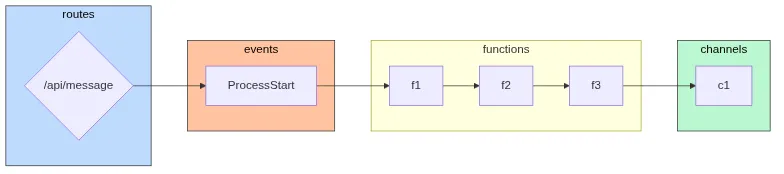
Structurizr
Section titled “Structurizr”To generate structurizr output
tc compose -f structurizr