Routes
name: TOPOLOGY-NAME
routes:  NAME_OR_PATH:    gateway: <String>    vertical: <String>    authorizer: <String>    method: POST|GET|DELETE|PUT    path: <String>    async: false    function: <String>    state: <String>    queue: <String>    event: <String>    request_template: <String>    response_template: <String>    request_params: <MAP>    response_params: <MAP>    stage: <String>    stage_variables: <Map>    CORS:      methods: [GET, POST]      origins: ["*"]      headers: [String]
Gateway is optional and required if you need to use an existing gateway. By default, tc creates a gateway with the name of the topology (namespace).
Authorizer
Section titled “Authorizer”Function Authorizer
Section titled “Function Authorizer”name: TOPOLOGY-NAME
routes: /foo: method: POST authorizer: my-authorizer function: function1
functions: my-authorizer: uri: ../my-other/authorizerCognito Authorizer
Section titled “Cognito Authorizer”We could also specify a cognito authorizer
routes: /api/foo: method: GET authorizer: cognito function: f1Request Response Mapping
Section titled “Request Response Mapping”To transform response and/or request mappings, we can set it as follows:
routes:  default:    authorizer: authorizer    request_params:      'append:header.auth_id': "$context.authorizer.auth_id"      'append:header.JWT': "$context.authorizer.jwt"
  /foo:    method: GET
If set in default, the remaining routes defined in the topology inherit the default config. The individual routes can still override the default.
Patterns
Section titled “Patterns”Request-response
Section titled “Request-response”By default, the entity targets are synchronous.
name: request-response
routes:  /api/ping:    method: GET    function: fetcher
Async request-response
Section titled “Async request-response”routes: /api/message: method: POST async: true event: GetMessages
events: GetMessages: producer: fetcher channel: messages
channels: messages: function: defaultQueued Requests
Section titled “Queued Requests”routes: /foo: authorizer: my-authorizer method: POST queue: foo-queue
queues: foo-queue: mode: FIFO function: function1Route Verticals
Section titled “Route Verticals”Route Vertical is an abstraction to map APIs to separate Gateways, yet using a common custom domain. For example, in the following diagram, we’d like api.myapp.com to be served by separate domain verticals (gateways) with optionally different Gateway configurations.
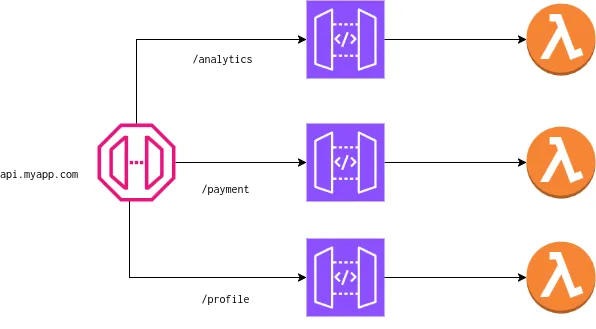
The diagram can be described in a topology.yml file:
name: example-routesinfra: ./infra
routes:  /analytics/timeseries:    method: GET    vertical: analytics    function: f1  /payment/process:    method: GET    vertical: payment    function: f2  /profile/contact:    method: GET    vertical: profile    function: f3
Now let’s say we want to route these verticals (analytics, payment and profile) to different sandboxes (separate topologies or DAG of entities). We can represent that in {INFRA_DIR}/routes.json
{ "verticals": { "api.myapp.com": { "payment_beta": ["/payment"], "analytics_alpha": ["/analytics"], "profile_stable": ["/profile"] } }, "domains": { "default": { "stable": "api.{{env}}.myapp.com" } }}Here the payment_beta, analytics_alpha and profile_stable are seprate sandboxes with each being it’s own function or topology.
Constraints
Section titled “Constraints”- Path prefixes in routes.json should not contain a trailing ’/’.
- The custom domain to route should also be present in the domains block in routes.json. tc will manage the certs and zone records.
- It is also not possible to have a route same as the path prefix. For example
/paymentroute in topology.yml and/paymentpath prefix in routes.json are invalid. However,/payment/processand/paymentpath prefix (vertical) are valid.
Gateway Modes
Section titled “Gateway Modes”There are 3 modes in which tc handles API Gateways:
- If no gateway or vertical attribute is is specified in routes, tc uses the topology name as the gateway and will create it.
- If gateway is specified in the routes, tc will try to use it and not create/manage it.
- If vertical is specified, tc creates a sandboxed API gateway for that vertical. Verticals are not namespaced and are global.
Example: examples/routes
Configuration
Section titled “Configuration”Sandbox-specific configuration
Section titled “Sandbox-specific configuration”We can set custom domains in a configuration, typically in INFRA_DIR/
{ "domains": { "default": { "stable": "service.mydomain.com", "dev": "dev.mydomain.com" }, "prod": { "stable": ["prod.mydomain.com"] } }, "throttling": { "default": { "stable": { "burst_limit": 120, "rate_limit": 90, "authorizer_cache_ttl": 0 }, "dev": { "burst_limit": 120, "rate_limit": 90, "authorizer_cache_ttl": 90 } } }}The domains leaf value can either be a string or a list of strings.
Region-specific domain routing
Section titled “Region-specific domain routing”By default, tc does not update the domains. To override the behavior, we can set TC_UPDATE_DNS=1 env var when creating or updating the topology.
To explicitly route a domain to a sandbox in any region, we can do:
tc route -s yoda -e dev --region us-west-2DNS routing is explicit unless TC_UPDATE_DNS is enabled. This is a practical way to do blue-green deploys or region failovers.
Default configuration
Section titled “Default configuration”At times, we may want to define the defaults for all the routes. For example:
routes:  default:    doc-only: true    gateway: my-gateway    CORS:      methods: [GET, POST]      origins: ["*"]      headers: [String]
  /foo:    method: GET
  /bar:    method: GET
Here we set the defaults for all routes in the topology. The individual route can still override the default.
Managing complexity
Section titled “Managing complexity”To place the routes in separate files, including default, we can do the following:
name: example-routesinfra: ./infra
routes:  !read ./default.yml  !read ./v1/routes.yml  !read ./v2/routes.yml